Godot
Use a NinePatchRect: panel margins 16 px on all sides, with tiled axes. Bars and ribbon use 16 px left/right and zero top/bottom.
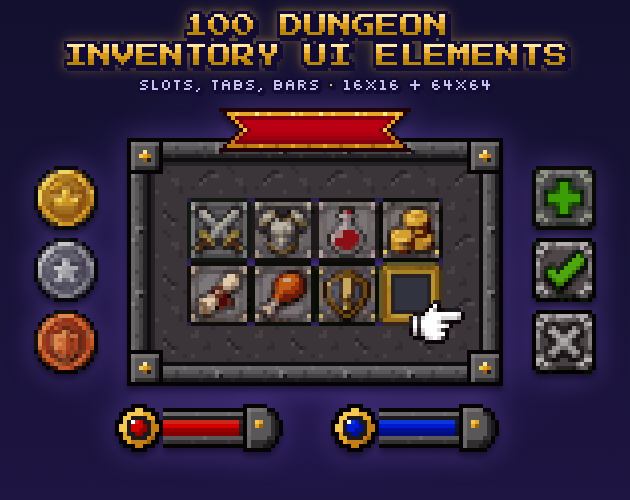
In-scene preview · Display art with example items
Released pack · Wyrm & Wand · N8
100 Dungeon Inventory UI Elements · 16×16 Pixel Pack · v1.1
Stone-edged panels, inventory slots and resource bars for the quiet moments between dungeon encounters.
Free ZIP download. No payment required. Previous purchases remain available through My downloads.
Inspiration & worldbuilding
A dungeon interface should feel as though it belongs to the place beyond it. Dark stone, restrained trim and bright resource colours suggest a tool the player could carry into a crypt, a ruined keep or a subterranean workshop. The decorative frame gives the world a voice; clear slots, tabs and gauges keep the information legible.
Use the inventory as a recurring refuge. After an encounter, it becomes the place to compare a new weapon, count the remaining potions and decide whether to press on. Health, mana and stamina can keep the same visual hierarchy across combat and preparation screens. Tabs and buttons give the larger inventory a structure without asking every item icon to do that work.
The window and bar pieces are modular. Fixed corners, repeatable edges and filled or empty middle segments let you build different layouts from the same vocabulary. Eight assembled examples are included to demonstrate those joins; you provide the interface logic, input handling and game state.
Inside the collection
See the inventory and resource bars in context, then expand the contents index for the full file list. Your free download includes every original tile and assembled texture.
The sample layout includes item icons for context. The download contains the Dungeon Inventory interface artwork listed below.


Stone slots, ribbon and resource bars become an inventory screen. Item icons illustrate placement and are not included in this download.

See another possible layout using the panel, bars and ribbon. The sample wand is not included; native dimensions and border guides are listed below.
Inside the download
| Artwork | 100 static interface tiles, supplied twice; 8 assembled textures |
|---|---|
| Native / enlarged | 16 × 16 px / 64 × 64 px; exact nearest-neighbour 4× copies |
| Sprite sheets | 160 × 160 and 640 × 640 px; 10 × 10 cells; no padding |
| Assembled textures | 1 panel at 48 × 48; 6 resource bars and 1 ribbon at 48 × 16 |
| Tiled borders | Panel: 16 px on all sides. Bars/ribbon: 16 px left and right |
| Transparency | RGBA PNG; transparency where appropriate, with one opaque native fill |
| Current package | Version 1.1 · 0.25 MiB ZIP (260,278 bytes) |
| Included documentation | README and license; spritesheet_index.txt |
| Engine delivery | PNG image assets with written import guidance; no native engine project, scripts or prefabs |
| Audio | No sound effects included |
| Production notes | Editions and file preparation are described in the included README and license. |
From download to scene
The included README provides the pack-specific setup. These are image assets you configure in your engine.
Use a NinePatchRect: panel margins 16 px on all sides, with tiled axes. Bars and ribbon use 16 px left/right and zero top/bottom.
Import as Sprite with Point filtering and no compression. Set panel borders to 16 px and Image Type to Tiled; bars/ribbon need left/right borders only.
Keep corners and end caps fixed. Repeat edges and centres instead of stretching pixels. The README maps the exact tile IDs and join order.
Use it in your game
This is a summary of this release’s LICENSE.txt. The file supplied in your download contains the full terms, including warranty and termination provisions.
Free ZIP download. No payment required. Previous purchases remain available through My downloads.
You are downloading version 1.1 and the contents listed here. No future pack, format or update is promised by this listing.
For a file or download problem, email support@wyrmandwand.com with the pack name. For a previous purchase, include your purchase email; previous itch.io orders remain available through itch.io.
100 distinct interface tiles, native 16 and exact 64 editions, plus 8 assembled texture examples, 2 sheets and 1 marketing preview.